
You have decided to stop writing every Bluesky post in the moment and start planning some of them ahead. Good. The next step is picking something to plan them in, and that is where it gets murky. Open a list of Bluesky scheduling tools and most of them describe themselves in almost identical language: schedule posts, manage a queue, see your analytics. The feature lists look interchangeable. The differences that will actually affect your week are usually not on those lists.
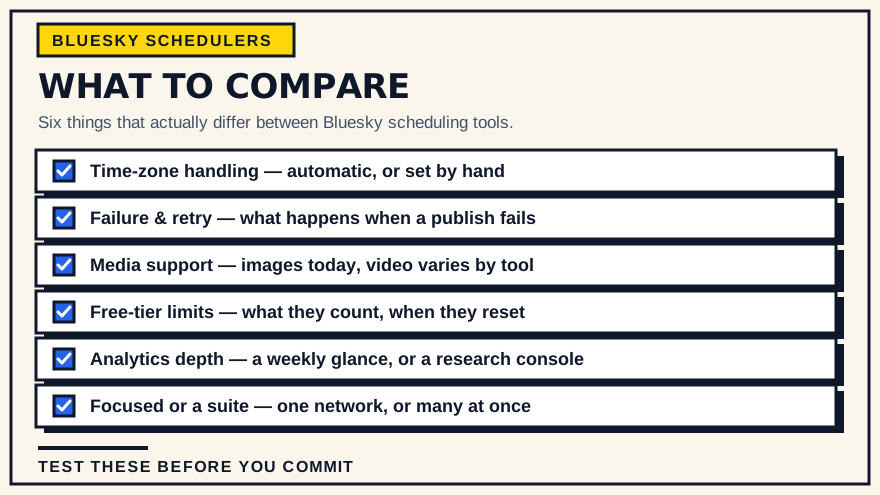
This guide walks through what to compare. It is not a ranking, because the right tool depends on how you post and whether Bluesky is the only place you publish. By the end you should be able to look at any option — including SkyyCast, which we make — and tell fairly quickly whether it fits.
Why Bluesky changes the checklist
Bluesky has no native scheduling. It is a real-time service: you write a post, you send it, it appears. There is no "schedule for later" button anywhere in the official app or website. So every scheduled Bluesky post goes through a third-party tool that holds your post and publishes it on your behalf at the time you picked.
That has a few consequences for what you should look for:
- The tool connects to your Bluesky account, so how it connects and what it stores matters more than it would for a tool that only touches your own files.
- Bluesky runs on an open protocol (the AT Protocol), and the ecosystem is young. Tools vary a lot in how completely they support Bluesky's own features.
- Because the tool is doing the publishing, what happens when publishing fails is a real question, not a hypothetical one.
Keep those three in mind as you read the rest.
The things worth comparing
How it handles time zones
This sounds boring and turns out to be the thing people get burned by most often.
When you schedule a post for "8:00 AM," you mean 8:00 AM where you are. But a scheduling tool has to turn that into an exact moment in time, store it, and fire it later — possibly from a server in another part of the world, possibly after the clocks have changed for daylight saving, possibly after you have travelled.
This matters most once you are scheduling more than a couple of posts. The basic mechanics of scheduling a single Bluesky post are similar everywhere; it is the handling around the edges, starting with time, where tools diverge.
Questions to ask:
- Does the tool detect your time zone automatically from your browser or device, or does it make you choose a zone or type in a UTC offset? Automatic detection removes a whole category of mistake.
- When daylight saving shifts, do your already-scheduled posts stay at the wall-clock time you intended, or do they drift by an hour?
- Is the scheduled time stored as an absolute instant, so it is unambiguous no matter where the publishing happens?
A tool that gets this right is invisible. A tool that gets it wrong produces posts that go out at 7:00 AM or 9:00 AM for reasons you cannot see, and you usually only notice weeks later.
What happens when a post fails
Scheduled publishing is a small automated task, and small automated tasks fail sometimes: a network blip, a temporary outage, an authentication token that expired and needs refreshing. The question is not whether failures happen. It is what the tool does about them.
Look for:
- Does it retry? A transient failure that is retried a minute later usually succeeds. A transient failure that is not retried becomes a post that silently never went out.
- Does it tell you? A failed post should show up clearly as failed, not disappear or sit forever in a "publishing" state.
- Can you recover? You want to be able to re-send a failed post or reschedule it without rebuilding it from scratch.
A scheduler that publishes reliably almost every time but says nothing on the occasions it does not is worse than knowing you have to post manually, because you have stopped checking.
Media support, and being honest about video
Bluesky supports images and, more recently, video posts. Not every scheduling tool supports both, and the gap is easy to miss because marketing tends to say "schedule your posts" without listing formats. If you mostly post text and images, most Bluesky schedulers will cover you. If video is central to what you do, check carefully — some tools schedule image posts but not video yet.
SkyyCast is a concrete example of the limits to check: it schedules text, image (up to four per post) and MP4 video posts, with one video per post and never a video mixed with images. It does not schedule threads. Whatever tool you consider, confirm the exact format limits rather than assuming them.
Free allowance versus paid
Most Bluesky schedulers have a free tier and a paid tier. The details of the free tier matter more than the headline "free."
- What does the limit count? Some tools limit how many posts you can have scheduled at once. Others limit how many posts actually publish in a period. A limit on successful publishes is usually the more predictable model.
- When does it reset? Monthly is common. Check whether it is a rolling 30 days or a calendar month.
- What is gated behind paid? Often it is the volume limit and the deeper analytics. Sometimes it is basic things like being able to schedule at all beyond a handful of posts.
For reference, SkyyCast's Free plan includes 15 successful publishes per UTC calendar month, resetting at the start of each month, with the full scheduling and queue workflow available. The paid Pro plan removes that monthly limit and adds more detailed performance analytics. Whether that free allowance is enough depends entirely on your cadence — someone posting three times a week fits inside it comfortably; someone posting three times a day does not.
How much analytics you actually get
"Analytics" covers a wide range. On the light end, it is a count of likes, reposts and replies per post. On the heavier end, it is trends over time, best-performing formats, and posting-time patterns.
Decide how much you need. If you check numbers once a week to see whether you are trending up or down, light analytics is fine and you should not pay extra for a dashboard you will not read. If you are actively testing what works, deeper analytics earns its place. Also check whether analytics is free or a paid feature, and whether the tool is upfront that engagement numbers on Bluesky come with real limitations — what the available analytics can and cannot tell you is worth understanding before you lean on any dashboard.
Whether links, hashtags and mentions come through
On Bluesky, a hashtag, an @mention or a link is only active if the app that publishes the post creates it as a separate annotation (a facet) alongside the text. Bluesky's rich-text documentation says the API does not detect these automatically, and that the publishing client must generate them. The official app does; a scheduling tool may or may not. Do not assume: schedule a post containing a tag, a mention and a URL a couple of minutes ahead, then look at the live post and see whether each one is tappable and whether a link card appears. When we ran that test on SkyyCast in September 2026, the post was published as plain text — the tag, mention and URL were not clickable and there was no card — so it is a real difference between tools, not a formality. Our hashtag guide covers what that means in practice.
Focused tool or part of a suite
Some Bluesky scheduling lives inside large social-media-management platforms that handle many networks at once, with a shared calendar, team roles and approvals, a unified inbox and cross-network reporting. Others are focused tools that do Bluesky and nothing else. Neither is automatically better; they answer different situations.
A suite earns its keep when your work is genuinely spread out: several networks on one calendar, more than one person touching the content, or one report comparing a campaign across channels. The trade is that pricing usually scales with seats, channels or volume, there is more to learn and maintain, and features specific to one network can arrive later because each network gets a share of the development attention. A suite also makes it easy to send one piece of text everywhere, and visibly cross-posted text tends to land flat on a network like Bluesky, where the tone is often more conversational.
A focused tool assumes Bluesky is the point: fewer screens, a shorter path from writing a post to scheduling it, and handling built around one network's behaviour. The trade is equally real — it does not post anywhere else, team features are lighter or absent, and if you grow to three or more networks, one tool per network becomes its own mess.
Five questions usually settle it:
- How many networks do you post to regularly? One or two leans focused; three or more leans suite.
- Is Bluesky your main channel or a side channel? If it is main, a focused tool fits; if it is one of many, it may not justify a dedicated tool.
- Does anyone else need to review or schedule posts? A real approval process points to a suite; just you points to focused.
- What shape is your budget? Comfortable with per-seat or per-channel pricing that grows favours a suite; a flat, small or free cost favours focused.
- Do you need video today? Check format support in any tool you consider — it varies and is easy to assume.
Using both is common and sensible: a suite for the networks you cross-post to, and a focused tool for the one where you do your most deliberate posting.
Sign-in and the account model
Because the tool publishes as you, look at how it authenticates:
- How do you sign in to the tool itself — email and password, or an existing identity like Google?
- How does it connect to Bluesky — through Bluesky's OAuth flow, or by asking you to paste an app password?
- What does it store, and can you disconnect Bluesky and reconnect later without losing your scheduled posts?
An OAuth connection that you can revoke from Bluesky's side is generally cleaner than handing a password to a third party. SkyyCast, for instance, uses Google sign-in for the account and Bluesky's OAuth flow for the connection, and you can disconnect and reconnect the Bluesky account without rebuilding your queue.
Web versus app, and how it behaves on a phone
Most Bluesky schedulers are web apps. Check that the one you pick is usable on the screen you will actually use. If you draft on a laptop but check the queue from your phone, a dashboard that only works well at desktop width will quietly push you back toward posting manually.
Getting your content out
Easy to skip, annoying to discover late. If you build up months of scheduled posts in a tool, can you leave? At minimum, your planned posts should stay visible and easy to recreate rather than locked away.
The four common approaches, and where each one fits
Every point below is a general characteristic of the approach, not a claim about a specific product.
Posting manually. No setup and nothing to maintain. Timing is always "now," so there is no time-zone question and no failure to recover from. It handles images and video equally, because you are just using Bluesky directly. It suits occasional posting, and it stops scaling the moment you want posts to go out while you are asleep or busy.
A focused Bluesky scheduler. Low setup. Time-zone handling is usually automatic, and retry behavior varies enough that you should check it. Image support is standard; video support is not — confirm it. Pricing is commonly a free tier plus a flat paid plan. It fits best when Bluesky is your main network and you want scheduling without extra machinery.
A multi-platform suite. Moderate to high setup, because there is more to configure. Time-zone handling is usually configurable and sometimes manual; retry behavior, again, varies. Images are always supported; video support depends on the network and the tool. Pricing is often per seat or per channel, so it scales with your team and your channel count. It fits when you manage several networks and want one calendar for all of them.
Your own script against the API. High setup, because you are building it. Everything — time zones, retries, media handling — works exactly as well as you make it. Bluesky's protocol is open, so nothing is off limits. This fits people who are comfortable maintaining a small program and want full control.
What building a Bluesky scheduler taught us
We build SkyyCast, so some of these criteria come from work we had to do ourselves. Four lessons, kept at the level of principle:
- Store times as absolute instants. A scheduled time only means something if it is unambiguous. Saving "8:00 AM" without its zone, or as a wall-clock time, is how posts drift by an hour after a clock change or a trip.
- A timed-out publish is not the same as a failed one. If the connection drops while a post is being sent, Bluesky may already have accepted it. As far as we can tell, the AT Protocol has no client-supplied idempotency key for creating a post, so a tool cannot make a blind retry safe. That is why SkyyCast treats this case as its own category, warns about the duplicate risk, and limits manual retries to five attempts with a five-minute cooldown.
- Check limits against the source, not memory. The 2,000,000-byte image limit and four-image cap come from Bluesky's published schema; SkyyCast's composer enforces the four-image cap and prepares any image over the size limit in the browser before anything is uploaded, so an oversized image is handled up front instead of failing at publish time.
- Test what the protocol actually receives. Our own end-to-end test showed that text which looks like a hashtag or link in a composer preview had reached Bluesky as plain text. The preview is not proof of the published result, and that is worth checking in any tool you evaluate.
Where SkyyCast fits
SkyyCast is a focused Bluesky publishing tool, so it lands in the second column above. Concretely:
- You sign in with Google and connect Bluesky through its OAuth flow.
- It detects your browser or device time zone automatically, and the backend stores each scheduled time as an absolute UTC instant, so a post fires at the wall-clock time you picked regardless of where publishing happens or whether the clocks have changed.
- Scheduled posts sit in a queue and publish on their own. If a publish fails, it is retried and surfaced so you can act on it rather than discovering a gap later.
- The Free plan covers 15 successful publishes per UTC calendar month with the full workflow. Pro, at $9/month or $90/year, removes that limit and adds more detailed performance analytics. See the pricing page for the current details.
- It schedules text, image (up to four per post) and single-MP4 video posts today. Post text is published as plain text: hashtags, @mentions and URLs are not converted into active tags, mentions or links, and no link card is attached.
- It is a responsive web app, so the queue and composer are usable from a phone as well as a laptop.
SkyyCast is likely a good fit if Bluesky is the network that matters most to you, you post text, images or single videos, and you want a short, predictable path from writing a post to having it scheduled. It is not the right pick if you need scheduled threads, or if you want one dashboard for Bluesky plus several other networks.
When a different choice is better
- You post only occasionally. If you publish once or twice a week when the mood strikes, the honest answer is that you may not need a scheduler at all. Posting live keeps things simple and there is nothing to maintain. Scheduling earns its place mainly once a missed day actually costs you something.
- You manage several networks. If Bluesky is one of four or five places you post, a multi-platform suite will save you more time than a focused tool, even if its Bluesky-specific handling is a little behind.
- You want full control. If you are comfortable maintaining a small program and want your publishing to work exactly your way, the AT Protocol is open and you can build against it directly. That is more work, but nothing is hidden from you.
A short checklist before you commit
- Schedule one real post for a specific time and confirm it goes out at exactly that time.
- Check what the tool does with a post it cannot publish — does it retry, and does it tell you?
- Confirm it supports the formats you use, especially video if that matters to you, and read the free tier limit: what it counts and when it resets.
- Make sure you can disconnect and reconnect your Bluesky account without losing your scheduled posts.
Common questions
Does Bluesky have a built-in scheduler? No. Bluesky is real-time only. Any scheduled Bluesky post goes through a third-party tool.
Is scheduling posts against Bluesky's rules? Scheduling through a tool that connects with your permission is a normal, accepted use of the platform. What matters is that the connection is one you authorized and can revoke.
Can I schedule video posts? Bluesky itself supports video, but scheduling-tool support for video varies. Confirm it explicitly for any tool you are considering. SkyyCast schedules text, image and single-MP4 video posts.
The short version
Most Bluesky schedulers can put a post out at a set time. The ones worth using also handle time zones without you thinking about it, do something sensible when a publish fails, are honest about which formats they support, and have a free tier whose limits you can predict. Match those against how you actually post, and the choice usually gets obvious.
If your posting is Bluesky-centred and image-based, see whether SkyyCast fits your workflow. If it is not, the checklist above still applies to whatever you pick instead.