
If you have decided to schedule your Bluesky posts instead of writing every one live, two kinds of tool tend to come up. One is a focused Bluesky app. The other is a well-known general scheduler like Buffer, which handles Bluesky alongside a lot of other networks. Both can put a post out at 9 AM on Tuesday. The difference is everything around that.
This comparison is published by SkyyCast, so treat it accordingly: we make one of the two tools. We have tried to describe Buffer accurately and fairly, and every Buffer fact here links to Buffer's own pages so you can check it. The goal is to help you tell which workflow fits how you post, not to argue that one tool wins.
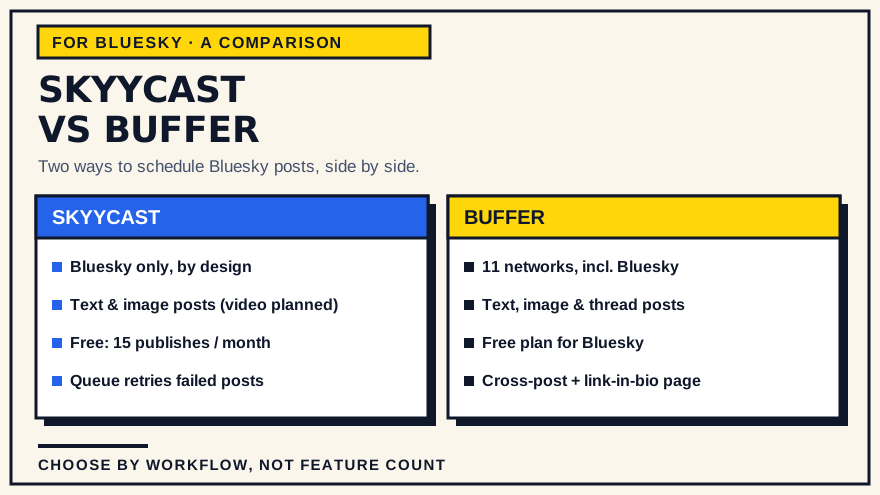
What each tool is
SkyyCast
SkyyCast is a scheduling and publishing tool for Bluesky only. You sign in with Google, connect your Bluesky account through its OAuth flow, and schedule text, image and video posts. It detects your browser or device time zone automatically and stores each scheduled time as an absolute moment, so a post fires at the wall-clock time you picked even across a daylight-saving change. Scheduled posts sit in a queue and publish on their own; if a publish fails, the queue marks it as failed with the reason and gives you a retry action, so you can act rather than discover a silent gap later. A post that was interrupted mid-publish is picked up again automatically, with a guard against posting it twice.
The Free plan covers 15 successful publishes per UTC calendar month, resetting at the start of each month, with the full scheduling and queue workflow. Pro costs $9/month or $90/year, removes that monthly limit, and adds more detailed performance analytics. A post can carry up to four images or one MP4 video. It is a responsive web app, so the composer and queue work from a phone as well as a laptop. There is no native mobile app and no support for any network other than Bluesky.
Buffer
Buffer is a social media management tool that supports many networks, including Bluesky, Facebook, Instagram, LinkedIn, Threads, Mastodon, Pinterest, TikTok, X and YouTube (its site has the current list). Its free plan lets you connect a Bluesky account and schedule posts at no cost. On Bluesky it supports text-only posts and posts with images, GIFs, links, or threads, and it can build a threaded post, which Bluesky does not do natively. You queue posts in advance and Buffer publishes them, with scheduling that accounts for time zones.
Buffer also bundles things a focused scheduler does not: one-click cross-posting of the same content to several networks, an AI assistant for drafting, a community inbox for replies, an analytics view it calls Insights, a link-in-bio page called Start Page, and API access. Buffer's plans, free-tier queue limits and current pricing are on Buffer's pricing page — check there rather than relying on a number in an article, because those details change.
How the day-to-day workflow differs
The clearest way to see the difference is to walk through scheduling one post in each.
In SkyyCast, you open the composer, write your post, attach an image if you want one, pick a date and time, and it goes into the queue. There is no step where you choose a network, because there is only one.
In Buffer, you first pick which channel or channels the post is for. Then you compose — optionally writing once and sending it to several networks at the same time — and add it to the queue for each channel. If you post to Bluesky, Instagram and LinkedIn, that shared step saves you real time. If Bluesky is the only place you post, choosing the channel every time is a small tax you pay for capability you are not using.
Neither approach is better in the abstract. It comes down to how many networks are actually in your routine. If you want to think this through more broadly, what to look for in a Bluesky scheduling tool covers the general criteria, and focused scheduler versus all-in-one suite digs into the breadth-versus-focus trade-off that this comparison is really an example of.
Feature and use-case comparison
Networks. SkyyCast is Bluesky-only by design. Buffer covers many networks including Bluesky. If you will only ever post to Bluesky, that is the single biggest factor, and it points in opposite directions depending on whether you see "one network" as focus or as a limitation.
Post types. Both schedule text and image posts to Bluesky. Buffer additionally builds Bluesky threads; SkyyCast schedules individual posts, and supports one MP4 video per post. Check Buffer's current Bluesky video support on their site if that matters to you. If threads are central to your posting, how to schedule a Bluesky thread explains what thread scheduling involves in general.
Time zones. SkyyCast detects your time zone automatically and stores an absolute instant. Buffer schedules with time-zone awareness as well. For a single poster in one place, both should simply work; the thing to confirm with any tool is what happens to already-scheduled posts when the clocks change.
Failure handling. SkyyCast's queue marks a failed publish as failed, shows the reason, and lets you retry it (retries are limited, with a short wait between them, in case the first attempt already reached Bluesky). Buffer publishes on your behalf too; if reliability behavior matters to you, it is worth testing directly with a real scheduled post on either tool rather than taking a feature list at face value.
Extras. Buffer includes a link-in-bio page, a unified inbox, an AI assistant and cross-network reporting. SkyyCast does not — it is a publishing tool with performance analytics on the Pro plan, and nothing else. Whether those extras are worth having depends entirely on whether you would use them.
Pricing shape. SkyyCast has a free tier with a fixed monthly publish allowance and a single Pro upgrade ($9/month or $90/year). Buffer has a free tier and paid plans; confirm the current structure and any per-channel costs on Buffer's pricing page.
Where SkyyCast tends to fit
SkyyCast is a reasonable choice if:
- Bluesky is your main or only network. The lack of a channel picker and multi-network settings is the point, not a gap.
- You post text, images or single videos, and you are fine scheduling individual posts rather than pre-built threads.
- You want the shortest path from writing a post to having it scheduled.
- A predictable free allowance and a flat $9/month (or $90/year) upgrade suit how you think about cost better than plans that scale with channels or seats.
- You want a queue that shows a failed publish and lets you retry it, instead of leaving you to notice a silent gap.
It is not the right pick if you need scheduled threads, or if you post to several networks and want one calendar for all of them.
Where Buffer tends to fit
Buffer is likely the better call if:
- You post to more than one network and want to plan them together.
- You want to write once and send to several networks in a click.
- You would actually use the extras — a link-in-bio page, a reply inbox, cross-network analytics.
- You want to schedule full Bluesky threads from the same tool.
- You are comfortable learning a broader platform in exchange for that reach.
Because Buffer's plans and free-tier limits change, decide against their current pricing rather than a snapshot.
A practical decision guide
Answer these and the choice usually becomes clear.
- How many networks do you post to regularly? One or two: a focused tool fits. Three or more: Buffer's breadth earns its keep.
- Is Bluesky your primary channel, or one of many? Primary: a Bluesky-only tool is built for that. One of many: a single-network tool will feel narrow.
- Do you need threads or video scheduled? For threads, Buffer schedules them and SkyyCast schedules single posts. For video, SkyyCast supports one MP4 per post; check Buffer's current Bluesky video support on its site.
- Would you use the extras? If a reply inbox, a link-in-bio page and cross-network reporting sound useful, that is a point for Buffer. If they sound like clutter, that is a point for a focused tool.
- Which pricing shape fits you? A fixed free allowance plus one flat upgrade, or a tiered plan that grows with your channels and team.
Conclusion
This is a fit question. SkyyCast is a narrow tool that does Bluesky scheduling with a small, predictable pricing model and a queue that surfaces failures and lets you retry them. Buffer is a broad tool that does Bluesky as one of many networks, with cross-posting and a set of extras around it. If Bluesky is where your attention goes and you want less between you and a scheduled post, a focused tool makes sense. If your posting is spread across networks, Buffer will carry more of the load. Plenty of people even use both — a focused tool for their main network and a broader one for the rest.
If your posting is Bluesky-centred, see how SkyyCast's workflow is put together before you decide. And if the tool you are weighing against SkyyCast is more analytics-led than Buffer, SkyyCast versus Metricool covers that comparison.
Common questions
Does Buffer support Bluesky? Yes. Buffer schedules text, image and thread posts to Bluesky, including on its free plan. See Buffer's Bluesky page for the current details.
Can SkyyCast post to other networks? No. SkyyCast is Bluesky-only by design. If you need to schedule other networks, you would use a second tool or a broader platform.
Can I schedule a Bluesky thread? Buffer builds and schedules Bluesky threads. SkyyCast schedules individual posts. How to schedule a Bluesky thread covers what thread scheduling involves generally.
Is there a free option with each? Both have a free tier. SkyyCast's Free plan allows 15 successful publishes per UTC calendar month with the full workflow. Buffer's free plan connects Bluesky and schedules posts, with its own limits on how much you can queue at once — check Buffer's pricing page for the current version.