
Every other major platform hands you a dashboard: impressions on each post, follower graphs, audience demographics. Bluesky does not. There is no native analytics screen, and the data the network exposes deliberately leaves out the number those dashboards lead with — how many people saw your post. That sounds like a gap, and in one way it is. But what you can measure on Bluesky is still enough to run an account well, as long as you know where the edges are.
What Bluesky shows you natively
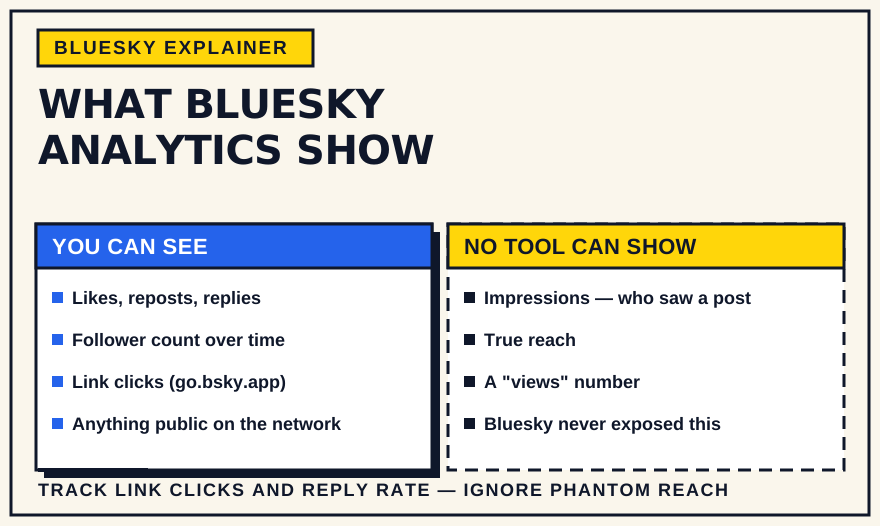
Inside the app, the analytics amount to the counters under each post: likes, reposts, replies, and quote-posts. Your profile shows follower and following totals and a post count. There is no history, no per-post trend, no breakdown of where a post was seen, and no aggregate view of how the account is doing over time. As of 2026, Bluesky has not shipped a native analytics dashboard and has given no timeline for one.
This is partly a design stance. Bluesky has leaned away from the engagement-optimisation loop that platform analytics tend to feed, and there is no ranking algorithm for a dashboard to explain. It also means the work of measurement sits with you and with independent tools.
What the open network makes possible
Bluesky runs on the AT Protocol, and most activity on it is public. Third-party tools tap that stream and record it over time, which is how you get the things the app itself will not show you:
- Follower growth over time. A curve instead of a single number, so you can see whether growth is speeding up, flat, or slipping.
- Engagement per post. Likes, reposts, and replies for each post, often with a median or average so a single viral post does not distort the picture.
- Posting patterns. How often you post, on which days and at what times, and how that lines up with when your posts get replies.
- Follows, unfollows, and blocks. Clearsky and similar tools track who followed or unfollowed you and surface block activity.
- Niche keyword volume. How much a topic is being discussed in your corner of the network — also what Bluesky's own Attie research feature is built to answer.
Many of these tools are free and need nothing more than your handle — GraphTracks, Bluesky Meter, Clearsky, Blueview, and Skystats are common starting points. Fedica and Metricool fold Bluesky into a paid multi-network dashboard.
What no Bluesky tool can tell you
Some limits are not tool problems; they are data problems, and no product can work around them:
- Impressions and reach. The post data Bluesky exposes has no impression or view field. A tool that shows you “reach” or “impressions” for a Bluesky post is estimating from engagement and follower counts, not reporting a measured number. Treat those figures as models, not facts.
- Who saw a post but did not engage. Without impressions there is no denominator, so you cannot calculate a true engagement rate the way you can on X or Instagram.
- Where the views came from. There is no feed-by-feed breakdown showing that a post did well in one custom feed and nowhere else.
- Audience demographics. Age, location, job title, and interests are not in the data. Any demographic claim about your Bluesky audience is loosely inferred from bios and behaviour.
This is worth saying plainly, because several tools present estimated reach in the same confident style as a real metric. On Bluesky, it is not one.
The one real outcome metric: link clicks
If you share links, Bluesky routes them through a short go.bsky.app redirect, which means your own website analytics can see traffic arriving from Bluesky. Add campaign tags to the URL and you can attribute clicks, sign-ups, or sales to specific posts. It is the closest thing Bluesky offers to a “did this actually do anything” number — and it lives in your analytics, not Bluesky's.
Which numbers are worth watching
Given all that, a short list covers most of what matters:
- Follower growth direction. The trend over weeks, not the total. Up, flat, or down is the signal; the exact count is vanity.
- Replies per post. Conversation is the engagement that carries a post into feeds and in front of new people. It matters more than passive likes.
- Engagement relative to your size. Ten replies means something different at 200 followers than at 20,000. Judge posts against your own baseline.
- Reposts and quote-posts. Each one puts your post into a new timeline. For spread, they are worth more than a like, even though none of it registers as an impression.
- Which topics and formats draw replies. A qualitative read of your last twenty posts tells you more than any single metric.
- Link clicks, if traffic is the goal. From your site analytics, as above.
Things to mostly ignore: absolute like counts, estimated reach, and day-to-day follower wobble.
A lightweight way to track it
You do not need a dashboard. Once a week, note five things: follower count, how many posts you published, your median likes-plus-reposts-plus-replies, your top post, and link clicks if relevant. A simple spreadsheet makes trends visible faster than most tools, and it keeps the focus on direction rather than individual-post noise. Folding that review into a regular posting routine, and using what you learn to shape the next month's calendar, is the whole loop.
The bottom line
Bluesky measurement is shaped around engagement and growth, not reach. There is no impression count, and no tool can invent one honestly. Accept that, watch a handful of trend lines, pay attention to which posts start conversations, and check your own site analytics for clicks. That combination tells you most of what a native dashboard would — and it points at the thing that actually grows an account here: posts people reply to.