
Scheduling a Bluesky post ahead of time sounds simple, but it's easy to get wrong in a way that quietly defeats the point: you write the post, then forget about it, then find it half-finished a week later. This walkthrough covers what actually makes scheduling work in practice.
Bluesky's official app doesn't include built-in post scheduling, so scheduled posts are handled by tools that connect to your account and publish on your behalf at the time you choose. The details differ between tools, but the workflow is the same everywhere: write the post now, pick a future time, and let the tool send it when that time arrives. Everything below applies regardless of which tool you use.
Get your account and connection ready first
A few minutes of setup prevents the most common failure mode, where a post sits in a queue but never actually publishes. Before you schedule anything, check the basics:
- Connect the exact account you post from, and confirm which handle it will publish as, rather than a test account or an old one you no longer use.
- Make sure the connection is still active. Access can lapse when you change your password or revoke an app, and a lapsed connection is the usual reason a scheduled post fails quietly.
- Draft in the same composer you'll schedule from, so the character count, link handling, and any image preview match what will actually go out.
- Decide on images and their alt text now, while the post is fresh in your mind, instead of trying to reconstruct the idea later.
Write the post first, decide the time second
It's tempting to pick a time slot before you've written anything, but that usually leads to rushed, generic posts written to fill a gap. Write the post the way you'd want it to read if you were posting it right now, and only then decide when it should go out. The scheduling step should never change what you're saying, only when it's said.
Because a scheduled post is read later, in a context you can't fully predict, edit it as if a stranger will see it cold. Watch for wording that only works in the moment you wrote it, such as "this morning," "later today," or "as I mentioned a second ago," since that phrasing lands oddly once the post is a few days old. Confirm that links still resolve, that mentions point at the right accounts, and that a multi-part thread still reads in order.
Pick a time you can actually predict
You don't need to reverse-engineer the "perfect" posting time before you start. A consistent, predictable time, one your audience can come to expect, tends to matter more than chasing an exact optimal hour. Start with a time that fits your own routine, and adjust later once you have enough posts to compare.
Two practical notes about time itself. First, a scheduled time is usually stored as a fixed moment, so if you cross time zones or a daylight-saving change happens before the post publishes, it still goes out at the absolute instant you set, which may not be the local hour you pictured. If timing matters, re-check the queue after any clock change. Second, avoid scheduling for a minute from now as a shortcut for posting immediately; leave enough of a gap that you can still glance back at the post before it goes live.
Rather than choosing a fresh time for every post, settle on one to three recurring slots that fit both your schedule and when your audience tends to be around, then post into those. Predictability is easier to sustain than precision, and it makes it easier for people to form the habit of looking for your posts.
Let the schedule hold the post, not your memory
The real value of scheduling isn't convenience, it's removing the dependency on you remembering to post at the right moment. Once a post is scheduled, it should live somewhere you can see it, a queue, so you're not relying on a calendar reminder or your own memory to follow through.
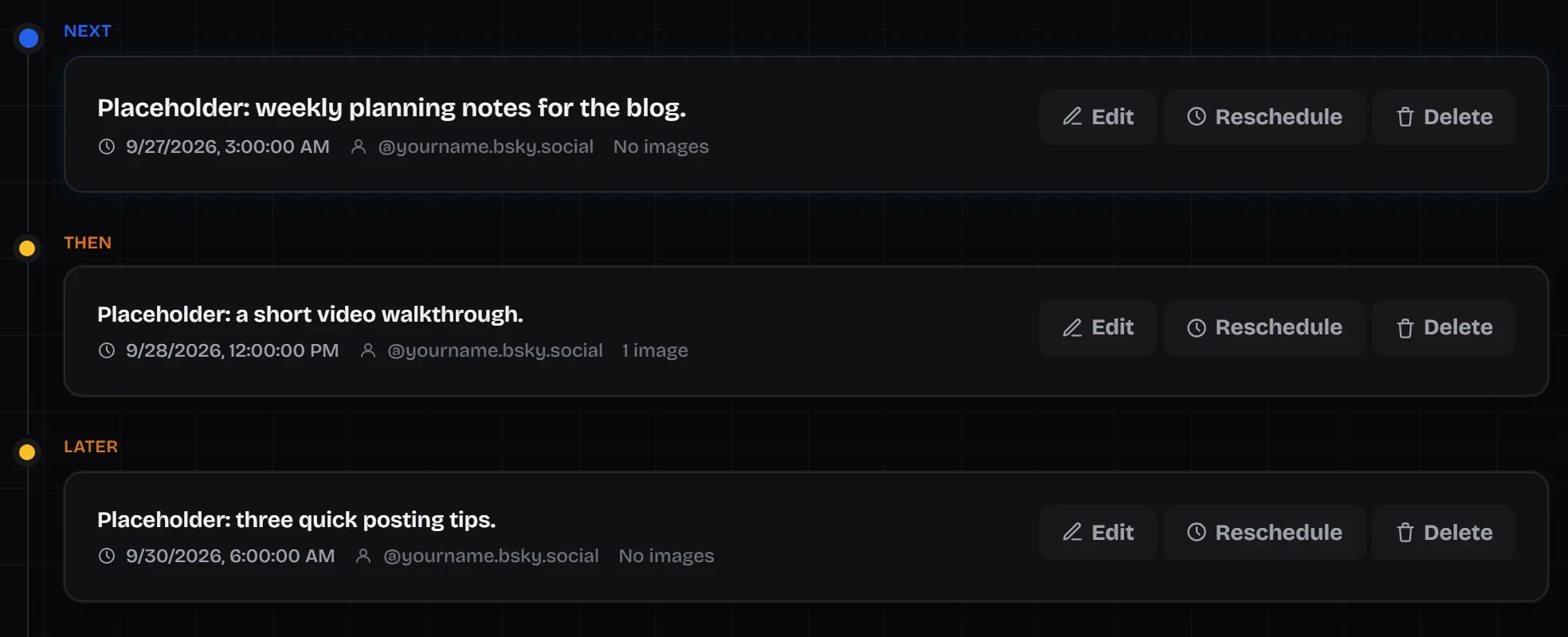
A visible queue does more than store posts. It shows the order and spacing of what's coming, so you can catch two posts stacked too close together or a three-day gap you didn't intend. It makes an accidental duplicate obvious before it publishes. And it works as a lightweight to-do list: one look tells you whether you're set for the next few days or need to write more. A scheduler that hides queued posts gives you none of that.
Review before it goes out, not after
A scheduled post isn't fixed the moment you set it. Plan to glance back over what's queued before it publishes, especially if something in the news or your own plans has changed since you wrote it. This is one reason a visible publishing queue matters more than a "set it and forget it" scheduler.
A useful pre-publish check takes about thirty seconds per post: has anything happened that makes it tone-deaf or outdated? Is there a typo you missed the first time? Does the link still work? Is it still something you want attached to your name? If the answer to any of those is no, you have options, edit the text, move it to a later time, or remove it, and doing any of those quietly is better than deleting and reposting after people have already seen it.
Common scheduling mistakes to avoid
- Batching everything into one timestamp. Five posts at the same minute reads like an automation dump; spread them out.
- Writing to fill the slot. An empty slot is better than a weak post. The schedule exists to serve your posting, not to be fed.
- Ignoring time-bound references. "Happening now" and "tomorrow" are traps in a post that publishes on a delay.
- Scheduling too far out. The further ahead you go, the more likely the context has shifted by the time it publishes. A week or two is usually plenty.
- Never opening the queue. Scheduling without reviewing just moves the "forgot to check" problem to a later point in the process.
- Treating scheduling as a reason to disappear. Scheduled posts still draw replies, so plan to come back and be part of the conversation.
A simple first-week routine
If you're starting from scratch, this is a low-effort way to get the habit going:
- Pick two or three posting times you can realistically stick to.
- In one sitting, write three to five posts you'd be happy to publish.
- Schedule them into your chosen slots over the next several days.
- Mid-week, open the queue for a minute to confirm everything still makes sense.
- At the end of the week, note what actually published and how it did.
- Repeat, using what you learned to shape the next batch.
Once that rhythm feels natural, it's worth turning it into a repeatable weekly workflow, and, if you'd rather plan themes than individual posts, a lightweight content calendar. If you're still deciding whether scheduling is worth the setup, this guide to choosing a Bluesky scheduling tool covers what to compare, including when you may not need one.
This is exactly the workflow SkyyCast's composer and queue are built around: you write and schedule a post, it sits in your publishing queue where you can still see and adjust it, and it goes out automatically once its time arrives.