
Bluesky has an unusually strong alt-text culture — people notice when images do not have it — and the platform makes adding it quick. This covers exactly how to add alt text to images and video, the setting that stops you forgetting, the one mistake you cannot undo, and an honest look at what alt text does and does not do for who sees your posts.
How to add alt text to an image
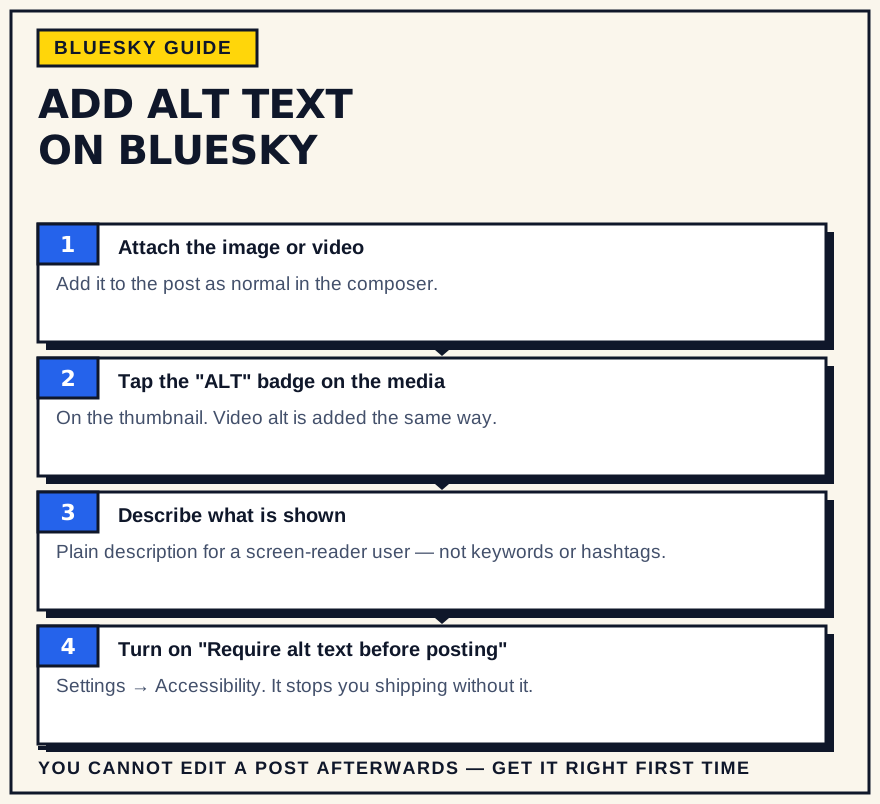
After you attach an image to a post, a small “+ALT” button sits in its upper-left corner. Tap it, type a description of the image, and save. The button then shows a checkmark instead of a plus. It works the same way on mobile and on the web, and the same whether you attach one image or four. Once the post is live, an “ALT” badge appears on the image so anyone can see a description is attached and open it.
You have far more room than you will usually need — well beyond the 300-character limit on the post itself — and alt text does not count against that post limit, so describing the image never costs you space in the caption.
How to add it to a video
Video works the same way, though Bluesky frames it as a written video description rather than “alt text.” Select the video in the composer and the description field appears beneath it; you may have to scroll down to see it. Write what happens on screen and any text that appears in the video.
Turn on “Require alt text before posting”
The single best change if you forget: go to Settings, then Accessibility, and switch on the alt-text requirement. With it on, Bluesky will not let you publish a post with an image until every image has a description — there is no skip option, unlike the reminder on X. As of now you have to enable it separately in the mobile app and on the website.
The one thing to get right the first time
You cannot edit alt text after a post is published. If you notice a mistake or a missing description, the only fix is to delete the post and make it again, which throws away any replies and reposts it had collected. It also means you cannot “fix it in the replies” in a way screen readers will pick up — the description has to be on the image itself, before it posts. So check the alt text before you hit post, and make it a fixed step in your posting routine, the same as checking the link works.
How to write it
Keep it functional. Describe what matters for the point of the post, lead with the subject, and include any words that appear in the image. Skip “image of” or “photo of” — screen readers already announce that it is an image. A sentence or two usually does it. For a chart, give the takeaway, not every axis label: “bar chart; referral clicks roughly triple over six months” beats a wall of numbers. For art and photography, describe the content plainly; how much detail to give is the artist's call, but “no description” is rarely the right answer.
What alt text does — and doesn't do — for reach
It is not an algorithm signal. Alt text does not boost a post, and it does not help you turn up in search or keyword feeds, which read the post text and not the description — so putting hashtags or keywords in the alt field does nothing except make the description worse for the people it is for.
Where it does affect who sees your posts: some custom feeds only include images that carry alt text, so a missing description keeps you out of those feeds entirely. And Bluesky's accessibility norm has teeth — accounts that routinely skip alt text get muted, get flagged by community labelers, and are less likely to be reposted by followers who care about it. There is no native in-app filter for images without alt text yet, only an open feature request, but feeds and labelers already do it.
Common mistakes
- Leaving it for later. There is no later. If you forget, the post is out with no description and no fix.
- “Image of a sunset.” Describe the sunset. The reader knows it is an image; they want to know what is in it.
- Keyword stuffing. Alt text is not indexed for search or feeds. A string of hashtags there helps nobody and annoys screen-reader users.
- Copying the caption. The caption and the alt text do different jobs. If they are identical, the image is described twice and not at all.
If you schedule or cross-post
Not every scheduling or cross-posting tool passes alt text through to Bluesky — some carry it, some drop it silently. Since you cannot add alt text to a post after it publishes, a tool that drops it leaves you with an image and no way to fix it. Before you rely on one, post a test image with alt text through it and check the result; if the description does not survive, schedule your text-only posts there and publish image posts by hand.
How alt text works in SkyyCast
SkyyCast's composer treats alt text as part of the attachment. Each image you attach has a + ALT button that opens an editor with a 2,000-character limit, and an attached video has one too. Alt text is optional in SkyyCast. It is saved with the post's media, so a scheduled post publishes to Bluesky with the description you wrote instead of dropping it.
Because alt text cannot be added after a post is published, open the ALT editor on every attachment before you schedule, not after.
Bottom line
Adding alt text on Bluesky is a button and a sentence. Turn on the requirement so you cannot forget it, get it right before posting because there is no editing it afterward, and treat it as a habit rather than a decision. Its payoff is accessibility and standing in a community that values it, plus eligibility for feeds that require it — not a bump from the algorithm, because there is not one to give.