
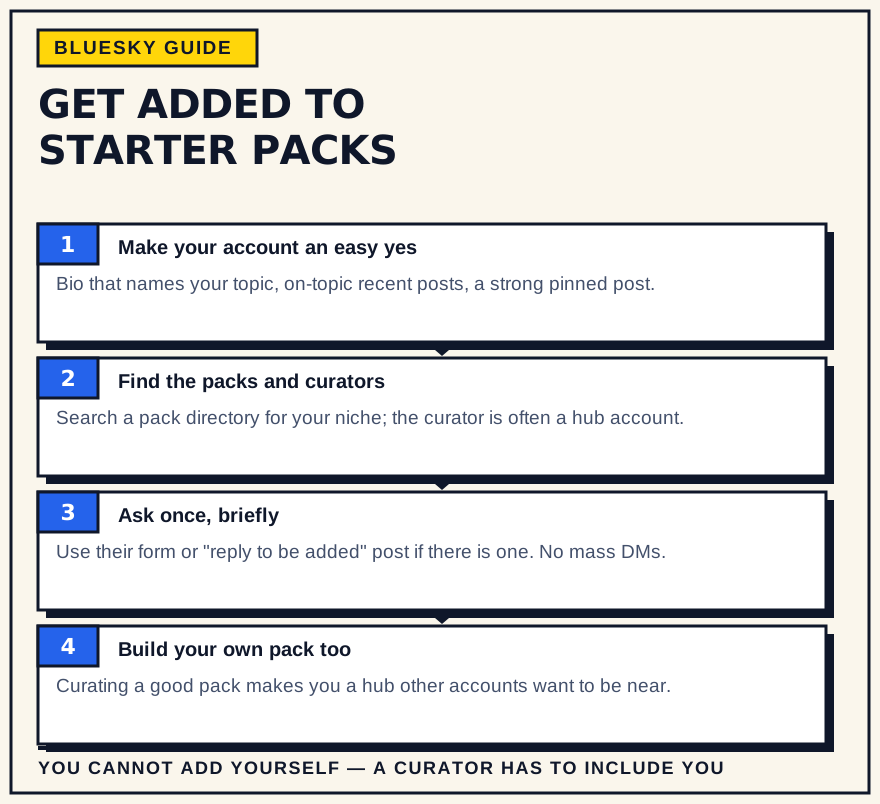
Starter packs are one of the quickest ways to go from unknown to followed on Bluesky. Each pack is a curated set of accounts with a “Follow All” button, so a single spot in a widely shared pack can bring in followers from people who have never seen one of your posts. The catch: you cannot add yourself. Someone else has to include you. This is how to make that happen.
How starter packs work
Bluesky introduced starter packs in June 2024. A pack can hold up to 150 accounts and up to 3 custom feeds, and it is entirely controlled by whoever made it. People share packs as a link or QR code; new users can adopt a pack's recommendations during sign-up, and existing users can tap “Follow All” or pick accounts individually. Blocking a pack's creator removes you from it.
The reach comes from that “Follow All” button and from packs being a default part of onboarding. Being in a strong niche pack means new arrivals to your corner of Bluesky are handed your account on day one, alongside the other people they were always going to follow.
One more thing packs do: when a pack is created or refreshed, the curator often asks everyone in it to share it. A boost from twenty accounts at once puts the pack — and you — in front of a lot of people quickly.
You can't add yourself, so what works instead
Bluesky has no application system for starter packs. Curators add accounts they already follow and rate. That leaves three things you can actually influence: whether a curator can tell what you do, whether you are genuinely relevant to their pack, and whether you ask in a way that makes saying yes easy. Reaching out cold with none of those in place rarely works; with all three, it often does.
Make your account easy to say yes to
A curator glances at a profile for a few seconds before deciding. Give them an obvious answer:
- A bio that names your topic. “Writing about urban planning and transit” beats a list of unrelated interests or a joke with no signal.
- A display name that carries a signal. Where it fits, a name or handle that hints at your subject saves a curator the guesswork.
- A pinned post that shows your best work. The first thing a visitor sees should be representative, not whatever you happened to post this morning.
- A recent feed that is mostly on-topic. If your last twenty posts are all over the place, a niche curator cannot place you. A consistent posting focus makes you legible, and showing up regularly keeps you current.
None of this is about volume. It is about a stranger being able to categorise you in five seconds.
Find the packs and curators in your niche
Search your topic in a starter-pack directory — Bluesky Directory, TheBlue.social, and blueskystarterpack.com all index public packs by subject. Note who created each one; that is the person you will eventually contact. It also helps to watch which packs accounts in your niche have shared or been added to, and to research who is active and influential in your corner of the network before you reach out.
You are looking for two or three packs that genuinely match what you post, not every pack that mentions your field.
How to ask
Keep it short, specific, and low-pressure. A reply or DM along the lines of: “I saw your [topic] starter pack — I post about [specific thing] a few times a week, here's a recent one: [link]. Happy to be considered if it fits.” That gives the curator everything they need to check and decide.
Leave out the long pitch and the follower-count case. A curator is checking topic fit, not audience size, and a wall of text makes the check harder, not easier.
- Use the process if one exists. Some pack creators run a form or a “reply here to be added” post. Use that rather than a cold DM.
- Offer to share it. Curators value the signal boost. If you are added, reposting the pack to your followers is a fair trade and it helps the pack work.
- Do not mass-message. Ten identical requests to unrelated curators read as spam, and word travels fast on a small network.
Build your own pack too
A pack takes a few minutes to make from the Starter Packs tab on your profile. Curating a good one for your community puts you among the other curators in your niche, and people you include will often return the favour. You can make several — one broad, a couple narrower — and pin the best to your profile so visitors see it. Keep it honestly useful, a real map of who to follow in the space, rather than a reciprocal-add ring, which readers see through quickly.
What not to do
- Rely on one pack. Aim for a few relevant placements; a single pack is not a growth plan.
- Ask strangers with no shared context. A curator who has never seen you has nothing to go on. Engage genuinely first.
- Expect a pack to fix a thin profile. New followers from a pack still click through. If the profile does not hold up, the follow does not stick.
Packs and lists: a quick note
Starter packs are not searchable inside the app the way lists are, and a long-standing proposal to merge the two features has not shipped as of 2026. It does not change the approach — it just means you find packs through directories and profiles rather than in-app search.
The bottom line
You cannot add yourself to a Bluesky starter pack, but you can make yourself an obvious pick: a clear, on-topic profile, a handful of relevant curators identified, and a short, specific ask. Do that for two or three packs in your niche, build one of your own, and starter packs become one of the lowest-effort ways to get in front of exactly the people most likely to follow you.