
Someone asks in a group chat what they should use to schedule Bluesky posts, and the first reply is usually the name of a big all-in-one social media platform. It is a reasonable answer — those platforms do schedule Bluesky posts. But if you sign up, the first thing you do is click past channels for five networks you do not use to find the one you do. It works, but it does not quite feel like it was built for you.
That is the real question here, and it is not "which tool is better." It is "which kind of tool matches how I post." A team running eight brand accounts across six networks has a genuinely different problem from one person who mostly posts to Bluesky and cross-posts occasionally. The tools that serve those two people well are not the same, and neither of them is doing anything wrong.
This piece lays out what each kind of tool gives you, what it costs you, and a short way to decide.
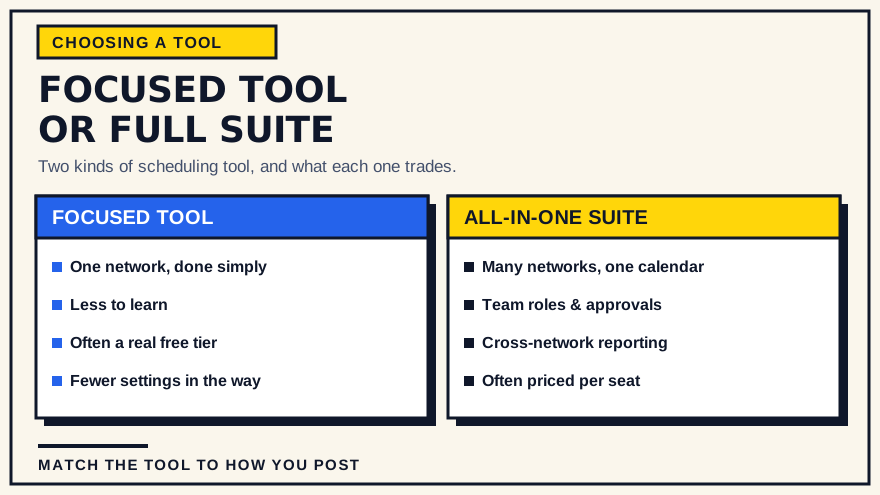
The two kinds of tool
An all-in-one suite is a social media management platform. It connects to many networks, and it typically bundles a shared content calendar, team roles and approval flows, a unified inbox for replies and mentions, cross-network reporting, and often extras like a link-in-bio page or social listening. The pitch is "run everything from one place."
A focused tool does one network. For Bluesky, that means scheduling, a publishing queue, and usually some analytics — built specifically around how Bluesky behaves. The pitch is "do this one thing without friction."
Both can schedule a Bluesky post for Tuesday at 9 AM. The difference is everything around that action.
What a suite gives you
A suite earns its keep when your work is genuinely spread out.
- Several networks in one calendar. If you post to Bluesky, Instagram, LinkedIn, a Facebook page and a YouTube channel, seeing all of it on one calendar is a real time-saver. Switching between five separate tools to plan a week is its own kind of tax.
- Team workflow. Roles, draft review, approvals, internal comments, an audit trail of who scheduled what. If more than one person touches the content, these are not luxuries.
- A shared asset library. Reusable images, brand-approved copy, saved captions.
- Cross-network reporting. One report that compares how the same campaign did across every channel, rather than exporting numbers from five places and stitching them together in a spreadsheet.
- Engagement in one inbox. Replies, mentions and DMs from every connected network in a single queue.
If two or three of those bullets describe a problem you actually have, a suite is probably the right call.
What you trade for that breadth
Breadth is not free, and the cost is not only money.
- Pricing usually scales with size. Suites are commonly priced per user seat, per connected channel, or per posting volume. That is fair — you are getting a lot — but it means the bill grows as your team or your channel count grows, and you are often paying partly for networks and features you do not use.
- More to learn and maintain. A platform that does inbox, listening, approvals, link-in-bio and reporting has a lot of surface area. Someone has to learn it, keep connections healthy, and manage seats. For a solo poster, that overhead can outweigh the benefit.
- Network-specific features can lag. When a suite supports a dozen networks, each network gets a share of the development attention. A new platform's quirks — or a new feature on an existing one — often land in a focused tool first and a broad suite later.
- Sameness creep. Because a suite makes it easy to send one piece of text everywhere at once, it quietly encourages doing exactly that. Posts that are visibly cross-posted tend to land flat on Bluesky, where the tone is a bit more conversational than on some other networks.
None of this makes suites bad. It makes them a fit for a particular situation: multiple networks, often multiple people, and a budget that can absorb per-seat pricing.
What a focused tool gives you
A focused Bluesky tool is built on the assumption that Bluesky is the point.
- Handling built around one network. Time-zone detection, the publishing queue, retry behavior, the way media is attached — all of it is designed for Bluesky's real behavior rather than a lowest common denominator across a dozen networks.
- Less to learn. There are fewer screens, fewer settings, and a shorter path from "I wrote a post" to "it is scheduled." You can usually be productive in a few minutes.
- A usable free tier is common. Because the scope is narrower, focused tools can often offer a free plan that covers real, if modest, usage rather than a time-limited trial.
- Fewer things between you and the task. No channel picker for networks you do not have. No approval step you did not set up. No dashboard modules you will never open.
If Bluesky is your main or only publishing home, that simplicity compounds. A repeatable weekly posting workflow is easier to keep going when the tool is not asking you to think about anything else.
What you give up with a focused tool
The trade is real and worth stating plainly.
- One network. A focused Bluesky tool does not post to Instagram or LinkedIn. If your mix grows, you either add a second focused tool, keep a manual routine for the others, or move to a suite.
- Lighter collaboration. Focused tools tend to have simpler or no team features. If you need formal approvals and multiple contributors, check carefully before committing.
- Possible tool sprawl. If you are already at three networks and climbing, standing up a separate tool per network can become its own mess. At some point one calendar wins.
A simple way to decide
Run through these five questions. Your answers point clearly one way or the other.
- How many networks do you post to regularly? One or two: lean focused. Three or more: lean suite.
- Is Bluesky your main channel or a side channel? Main: a focused tool is built for you. Side channel among many: it is probably not worth a dedicated tool.
- Does anyone else need to review or schedule posts? Yes, with a real approval process: you need a suite's team features. Just you: focused is fine.
- What shape is your budget? Comfortable with per-seat or per-channel pricing that grows: a suite is viable. Want a flat, small, predictable cost or a free tier: focused tools fit that better.
- Do you need to schedule video today? If yes, check format support on any tool you consider, focused or suite — it varies, and it is easy to assume.
Where SkyyCast fits
SkyyCast is a focused Bluesky tool, so it sits firmly on the "one network, done simply" side.
- Sign in with Google, connect Bluesky through its OAuth flow, and you are scheduling within a few minutes.
- Your time zone is detected automatically from your browser or device, and scheduled times are stored by the backend as absolute UTC instants, so posts fire at the wall-clock time you chose even across daylight-saving changes.
- Scheduled posts sit in a queue and publish on their own, with failed publishes shown in the queue and a retry action, and automatic recovery of a post interrupted mid-publish.
- The Free plan covers 15 successful publishes per UTC calendar month with the full scheduling workflow. Pro, at $9/month or $90/year, removes the monthly limit and adds more detailed performance analytics. The pricing page has the current specifics.
- It schedules text, image (up to four per post) and single-MP4 video posts.
- It is a responsive web app, usable from a phone as well as a desktop.
SkyyCast is a reasonable fit if Bluesky is the network you care about most and you want the shortest sensible path from idea to scheduled post. You can see how the workflow is put together before signing up for anything. If you run five networks with a team and formal sign-off, a suite will genuinely carry more of the load — and there is nothing wrong with using a focused tool for Bluesky alongside a suite for everything else. Plenty of people do exactly that.
If you are still weighing tools in general, what actually matters when choosing a Bluesky scheduler goes deeper on the specific things to test.
Conclusion
This is a fit question, not a leaderboard. A suite is the right tool for breadth: many networks, several people, cross-channel reporting. A focused tool is the right tool for depth on one network: less to learn, less to pay for, and handling built for how that network actually works. Answer the five questions above honestly and the choice usually makes itself. If your answer changes in a year because your setup changed, switching is not a big deal — that is a sign you chose well for the situation you were actually in.
Common questions
Can I use both a suite and a focused tool? Yes, and it is a common setup. A suite for the networks you cross-post to, and a focused tool for the one where you do your most deliberate posting.
Do all-in-one suites support Bluesky? Many now do. What varies is how completely they support Bluesky-specific behavior and how quickly new Bluesky features are added. Check the current state for any suite before you commit.
Is a focused tool always cheaper? Not always. Focused tools often have a free tier and flat pricing, while suites often price per seat or per channel. Compare against your real usage rather than the headline number — a suite can be cheaper for one person on a low plan, and much more expensive for a growing team.
Does SkyyCast post to other networks? No. It is Bluesky-only by design. That focus is the point of the tool, and also its main limitation.