
The advice to use a long, unique password for every account is correct and close to impossible to follow from memory. A typical person has dozens of logins; nobody recalls dozens of random strings. A password manager exists to resolve that contradiction: you remember one strong passphrase, and software remembers everything else.
That is the pitch. What is worth understanding before you trust one is where your passwords actually live, who can read them, and what happens if something goes wrong.
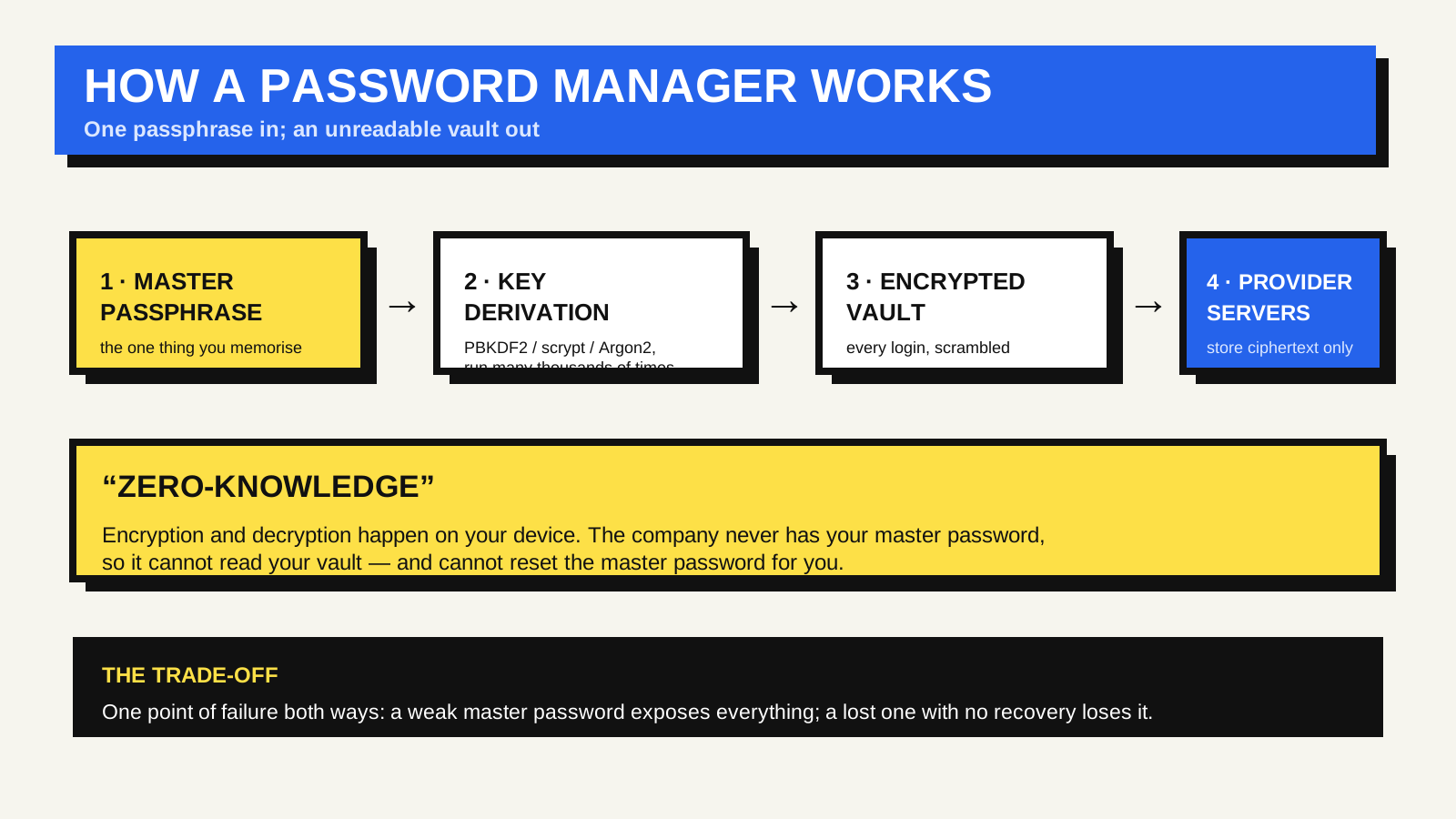
The vault and the one key
A password manager keeps your credentials in an encrypted file or database usually called a vault. The vault is scrambled with a key derived from your master password — the single passphrase you set up and memorise. Without that password, the vault is a block of random-looking bytes.
Turning a password into a key is a deliberately slow process. The manager runs your master password through a key derivation function — a purpose-built algorithm such as PBKDF2, scrypt or Argon2 — many thousands of times. The slowness is the feature: it makes brute-force guessing expensive. A short or common master password defeats it anyway, because an attacker working from a list of likely passwords still arrives faster than one guessing at random.
What “zero-knowledge” actually means
Most reputable password managers describe their design as zero-knowledge, or end-to-end encrypted. In practice this means encryption and decryption happen on your device, and the company’s servers only ever receive the already-encrypted vault. The provider stores ciphertext it cannot read, because it never has your master password or the key derived from it.
This is why these services can tell you plainly that they cannot recover your master password. It is not a customer-service policy; it is a consequence of the architecture. If a provider could reset your password and hand back a readable vault, the vault was never really private from them in the first place.
It also shapes what a breach of the provider looks like. If attackers steal a zero-knowledge vault database, they get encrypted blobs plus whatever metadata was left unencrypted, which can include saved site addresses depending on the product. Turning that into usable passwords still means cracking each vault’s master password one by one — quick for weak ones, impractical for long, unique ones.
The trade-offs worth thinking about
- A single point of failure, in both directions. Forget the master password with no recovery method set up and the vault is gone. Choose a weak one and everything is exposed at once. The answer is a strong, memorable passphrase plus whatever recovery option the product offers — a printed recovery key, an emergency contact, an account-recovery kit — kept somewhere safe and offline.
- Browser built-in versus standalone. Browsers now include competent password managers. They are convenient and free; the trade-off is that your passwords are tied to that browser’s account and ecosystem, and the extras — secure sharing, breach alerts, storing more than logins — are narrower than in a dedicated tool.
- Syncing means trusting the sync. If the vault syncs across devices, it passes through the provider’s servers. Zero-knowledge design is what makes that acceptable, and it is why the provider’s security model matters more than its marketing.
The quieter benefit: phishing resistance
Autofill is usually sold as convenience, but it also blocks a category of attack. A password manager fills a saved login only on the exact domain it was saved for. Land on a look-alike page at a slightly different domain and the manager stays silent, because the domain does not match. That silence is a useful signal that something is off — the same reason it pays to read a URL carefully.
It does not replace a second factor. Pairing a password manager with two-factor authentication covers the case where a password leaks anyway.
Are they actually safe to use?
Security agencies generally recommend them. The U.S. Cybersecurity and Infrastructure Security Agency advises using a password manager as part of basic account security, on the reasoning that the realistic alternative is reused and weak passwords, not perfectly memorised unique ones. Choose a long passphrase over a short-but-complex one — length is what current U.S. National Institute of Standards and Technology guidance emphasises — turn on two-factor authentication for the manager itself, set up a recovery method, and keep the app updated.
FAQ
What if the password manager company shuts down?
Reputable managers let you export your vault, usually as a CSV or an encrypted file. Export a backup periodically and store it securely. The ability to import into another manager is what keeps you from being locked in.
Is it safe to keep two-factor codes in the same manager?
It is a convenience-versus-isolation trade-off. Storing time-based one-time codes in the same vault as the password means one compromised vault exposes both factors. Some people accept that for usability; others keep second factors in a separate app or on a hardware key.
Should I trust my browser’s built-in manager?
For most people it is a large improvement over reusing passwords. If you want cross-browser access, secure sharing, or storage for things beyond logins, a dedicated manager gives you more.