
Most social platforms decide what you see with one company-run algorithm. Bluesky does not. Discovery there runs through feeds — the tabs across the top of the app — and most of them are built by other users, not by Bluesky. If your posts are not reaching people beyond your followers, the custom feeds in your niche are usually where the problem, and the fix, sit. This guide covers how feeds choose which posts to carry, and practical ways to get yours included.
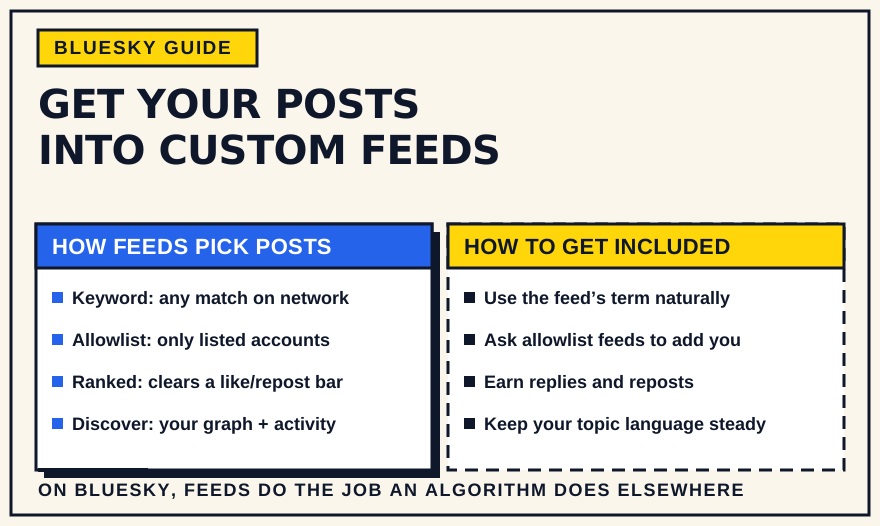
How custom feeds actually work
Bluesky introduced algorithmic choice with custom feeds in July 2023. A custom feed is a small independent service — a feed generator — that Bluesky's app queries for a list of posts. When you open a feed, the generator returns a skeleton of post references, and Bluesky fills in the actual content. What goes on that list is entirely up to whoever built the feed.
That design has two consequences worth holding onto. First, there is no single ranking system to game; each feed has its own rules. Second, many feeds have no follower requirement at all — if your post matches a feed's criteria, it appears there whether you have 50 followers or 50,000. Anyone can build a feed, and no-code tools such as SkyFeed and Graze mean plenty of niche feeds are run by ordinary users rather than developers.
A concrete example: a feed that collects every post containing a tag like “#plantsofbluesky” will show your photo to everyone who follows that feed the moment you post it, even if none of them follow you. A feed that only carries posts from a vetted list of climate scientists will never show yours unless you are on the list. Same feature, completely different path in.
The main types of feed, and how each picks posts
Feeds vary, but most fall into a few patterns:
- Keyword and hashtag feeds. These act like superpowered hashtags. The feed watches the whole network for posts containing a word, phrase, or emoji and adds every match. Put the term in your text and you are in — no approval, no follower threshold.
- Curated allowlist feeds. The feed only pulls from a fixed list of accounts the operator maintains — several large community feeds work this way. Your posts appear only once you have been added to that list.
- Engagement-ranked feeds. “Top of the week” style feeds sort by likes or reposts over a set window. Matching the topic is not enough; the post also has to clear an engagement bar to show up or stay near the top.
- Personalized feeds like Discover. Bluesky's default Discover feed blends your social graph, what people near you engage with, and posts picking up fast early activity. Since May 2024 it also takes direct feedback through “Show more / Show less like this” controls, so what any two people see there differs.
Find the feeds that matter in your niche
In the app, tap Search, then Feeds, or open your Feeds tab and choose “Discover New Feeds,” and search the topics you post about. Outside the app, Bluesky Directory and Goodfeeds catalog community feeds by subject, language, and popularity. It also helps to check which feeds well-followed accounts in your niche have pinned — those are the ones their audience actually reads.
You are looking for two or three feeds where your future readers already spend time, not a long list. Save and pin them so you can watch what does well there before you try to place your own posts.
Open each feed's description before you rely on it. Well-run feeds state what they include and exclude — a language filter, replies removed, a specific keyword list, an application process. Those rules tell you exactly what your post needs to do to appear.
How to get your posts included
- For keyword feeds, use the term the way a person would. Work the exact word or hashtag into your post text — not the image alt text, which most feeds do not read. One natural mention is enough; a pile of tags mainly signals spam, and better feeds filter for that.
- For allowlist feeds, ask to be added. Most community feeds have a pinned post or linked form explaining how to join, or a moderator you can message. Being an active, on-topic account before you ask makes a yes more likely.
- For engagement-ranked and Discover feeds, give people a reason to respond. Replies and reposts are what carry a post past your own followers. A specific claim, a question, or a real take draws more of that than a bare headline. Posting when your audience is online matters too, which is easier if you plan and schedule posts rather than rely on being at your keyboard at the right moment.
- Keep your topic legible. Feeds — and the people skimming them — match you faster when your recent posts and your bio use consistent language for what you cover. That is the same signal AI feed-builders such as Bluesky's Attie rely on when assembling a feed from a description.
- Consider building your own. If no feed serves your community well, a no-code keyword or list feed is quick to set up and gives people a reason to gather around your topic. A repeatable posting habit is what keeps it worth following.
What to expect, and what won't help
Getting into a feed is exposure, not guaranteed views. Many keyword feeds are chronological, so a post slides down as newer ones arrive — timing and cadence still decide how many people catch it. Keyword-stuffing to land in more feeds tends to backfire: it reads as spam, and the feeds worth being in are the ones that moderate against it. And chasing every possible feed is less useful than showing up consistently in the two or three that genuinely match your work.
The bottom line
On Bluesky, feeds do the job a recommendation algorithm does elsewhere, and they are unusually open about how they work. Learn the handful of feeds where your audience reads, work out whether each one runs on keywords, a curated list, or engagement, and shape your posting to fit. That, plus a steady cadence and posts people actually want to reply to, is most of what “getting discovered” on Bluesky comes down to.