
When someone pastes your link into a post or a chat and it expands into a card with a title, a blurb and an image, that card is not generated from the visible page. It is built from a set of meta tags in the page’s head that most platforms read when a link is shared. Get those tags right and the preview looks the way you intend almost everywhere; leave them to chance and each platform guesses, often badly.
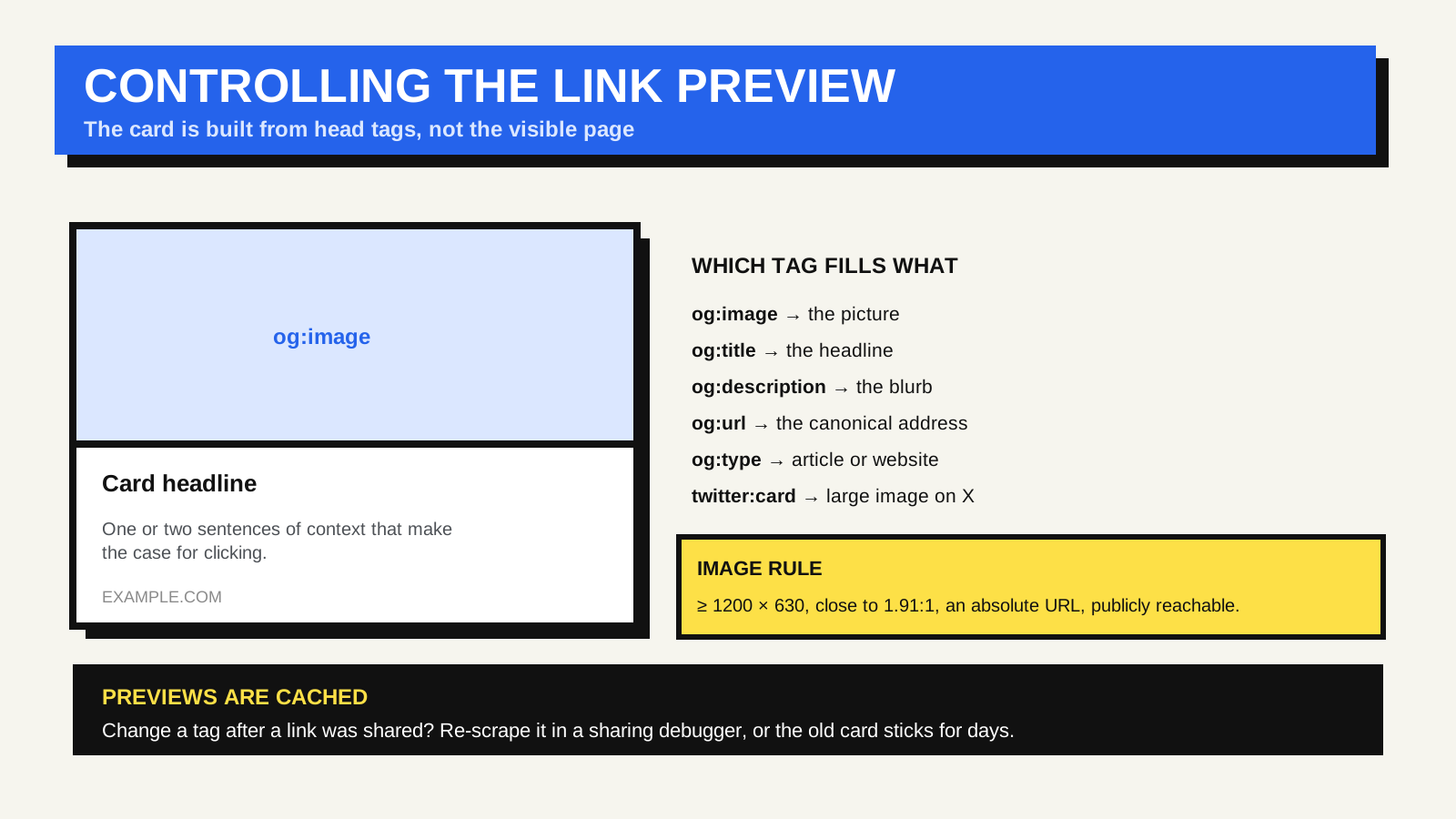
Where the preview data comes from
The de facto standard is the Open Graph protocol — a small set of meta tags, originally from Facebook, now read by most services that unfurl links. They sit in the document head alongside your other metadata, each one a property name paired with a content value.
- og:title — the card headline. It can differ from the page’s title element; keep it short, because cards truncate.
- og:description — one or two sentences of context. Like a meta description, it is a pitch, not a keyword line.
- og:image — the URL of the preview image. This is the tag people most often get wrong.
- og:url — the canonical address of the page, so shares of parameter-laden variants all resolve to one entry.
- og:type — usually “article” for a post, “website” for a home or section page.
The image rules
Facebook’s image guidance is a reasonable cross-platform baseline: use an image at least 1200 by 630 pixels, keep it close to a 1.91:1 ratio to avoid cropping, and stay above the 200 by 200 minimum. The image URL must be absolute and publicly reachable — an image behind a login or blocked by robots rules will not appear. Because previews render small and get re-compressed by the platform, the same care that keeps uploaded photos from looking blurry applies: start from a clean, correctly sized file.
Why the wrong image sticks — and how to fix it
Platforms cache the preview the first time a URL is shared, and they do not re-check on every subsequent share. So if you share a page, then change its og:image, later shares can keep showing the old one for days. The fix is to make the platform re-scrape the page. Facebook’s Sharing Debugger fetches the current tags on demand and refreshes its cache, and it shows exactly what it parsed — which makes it a useful general test tool even for sharing elsewhere. Other platforms have their own equivalents or clear the cache on their own schedule.
Twitter / X cards
X uses its own tag family — twitter:card, twitter:title, twitter:image and so on — but its parser falls back to the Open Graph tags when the twitter: versions are absent. So a page with solid Open Graph tags usually previews acceptably on X already. The one tag worth adding explicitly is twitter:card, set to “summary_large_image” if you want the large-image layout rather than a small thumbnail. X’s card markup documentation lists the rest.
Open Graph is not structured data
These are easy to conflate because both are metadata in the head. Open Graph controls how a link looks when shared on social platforms and in chat apps. Schema.org structured data, usually written as JSON-LD, is read by search engines and can influence how your result looks in search and which features it is eligible for. Different consumers, different formats — you generally want both, set independently.
A short pre-publish check
- og:title, og:description, og:image, og:url and og:type are all present and specific to this page.
- og:image is an absolute URL, at least 1200 by 630, publicly accessible, and not blocked by robots rules.
- twitter:card is set if you want the large-image layout.
- Run the page through a sharing debugger and confirm the parsed values and image match your intent.
- After any later change to the tags, re-scrape so caches update.
FAQ
My link shows no image at all. Why?
Most often the og:image URL is relative, points to a missing or login-gated file, is smaller than the platform’s minimum, or there is no og:image tag and the platform could not find a usable image on its own. Check that the URL is absolute and loads in a private browser window.
Can I set a different preview image per platform?
You can add both og:image and twitter:image with different images, and some platforms accept multiple og:image tags. In practice, one good 1.91:1 image that reads well at small size is simpler and more reliable.
Do link-preview tags affect SEO?
Not directly. They control social and chat previews, not search rankings. They matter for how often a shared link gets clicked, which is a real benefit — just not a ranking one.