
A portfolio PDF is easier to review when the selection, order, labels, and recipient's requirements all make sense together. This guide is a preparation workflow, not a promise that any portfolio will meet a gallery's or client's selection criteria.
Start with the recipient's brief
Before exporting, note the requirements that apply to this particular handoff: accepted page size, maximum number of works, file-size or page-count limits, and whether a statement, biography, contact page, or artwork details are requested. Do not infer requirements from another application. If the brief is unclear, ask the recipient rather than treating a tool setting as an official rule.
Artist Portfolio Studio has an optional submission checklist for limits and selected required fields. It can compare the PDF you create with the values you enter, such as maximum artworks, file size, page count, or required details. It cannot know requirements you have not entered, and a passing checklist is not gallery approval.
Choose and order the work deliberately
Select a coherent group that answers the brief. A series may work best together; a broader portfolio can show range, but each change in medium or subject should help the reader understand your practice. Use the collection order controls to make the opening piece a useful first impression and to group or contrast later work intentionally. The PDF artwork pages follow the order shown in the collection.
For example, in a hypothetical six-work color study, you might open with the piece that most clearly establishes the series, then arrange the remaining works to show variation in palette or composition. That is a planning example, not a tested result or a universal ordering formula.
Prepare images and add context
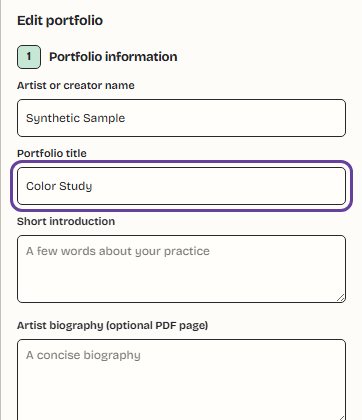
Use source images you are comfortable sharing. The Studio accepts JPEG, PNG, and WebP images, up to 12 artworks, with a 16-megapixel per-image limit and a 24-megapixel total input limit. These are tool limits, not submission standards. For each artwork, you can add a title and optional year, medium, and physical dimensions. Collection details include the artist name, portfolio title, a short introduction, statement, biography, contact information, and a website link.
If you also need separate image exports, choose a consistent square, portrait, landscape, tall, or custom image canvas and decide whether each artwork should fit in full or crop to fill. Those image-export dimensions are separate from the PDF's A4 or US Letter page-size setting. Check the artwork previews: fit preserves the full image, while crop-to-fill removes edges and should be used only when the composition still works.
Choose the PDF structure, then inspect it
Select the layout that fits the handoff: Minimal Gallery presents selected works, Photography gives landscape source images landscape pages, and Submission Focus uses an artwork-submission presentation with an optional image list. The cover, statement, biography, and contact pages are separate options; include them only when they add useful context and the relevant information is present. Optional pages affect the final page count.
Review the generated preview and the displayed page count and file size before downloading. If the recipient set a limit, enter that value in the checklist and resolve any warning. A large file may call for smaller source images or fewer optional pages; keep your originals and recheck the exported PDF after each change. Read a sample page at normal size to catch cropped edges, missing labels, or details that are too small to assess.
Pick the right output for the job
Use the Artist Portfolio Studio when you want an ordered collection with portfolio details and a designed PDF. A contact sheet is a quick overview, not a replacement for full-detail artwork pages. Use Image to PDF for a simpler image-per-page document without portfolio information, or Merge PDF when the source files are already PDFs. If an image itself needs different pixel dimensions before it goes into a portfolio, prepare a copy with Image Resizer and keep the original.
Know what happens to your files
The Studio builds exports in the browser and does not upload your artwork to SkyyCast. PDF support loads its existing library code when needed; the artwork remains in the current browser session and is not saved as a hosted portfolio. Download the files you want to keep before closing or reloading the page.